Categories
Blog Mobile App Development
Progressive Web Apps vs Native Apps
Mobile App Development

Progressive Web Apps
vs Native Apps

dual tech worlds showing pwa vs native app concept

GEt in Touch


    Web App vs Native App: What They Mean

    minimal tech shapes comparing web app and native app
    A web application runs in a browser and does not require installation. It is easy for users to access, but it has some limitations due to browser rules.
    A native application is installed from an app store and built for a single operating system. Native apps offer faster performance, access to device sensors, secure local storage, and access to system features.
    PWAs sit between these two. They bring the speed and access of the web with the look and feel of a native interface.

    What Is a Progressive Web Application (PWA)

    multi-device hologram showing progressive web application concept
    A progressive web application is a modern type of web app that feels like a mobile app. It uses HTTPS, service workers, and web manifests. Progressive web apps support offline access, quick loading, smooth navigation, and home screen installation. They work on any device with a modern browser.
    The principal value is progressiveness. The app grows based on device power without breaking older setups. This helps businesses reach users with simple access and low friction. As per this resource, PWAs can reduce load time and improve engagement, as shown in several case studies listed on PWA Stats.
    Teams that want to compare broader approaches can also review our guide on Native vs Cross-Platform Mobile Apps, which explains how both methods fit different product goals.

    Native Apps: Strengths and Limits

    Native apps are known for strong performance. Since they run with direct access to device hardware, they support real-time actions, gaming, advanced animation, multimedia, and full offline features. They align with platform guidelines and feel natural to users.
    The challenge is cost and time. Native apps need two separate builds for iOS and Android. Updates go through app stores, which can delay releases. Some users stop during installation because they must open the store and complete steps before using the app.
    For a deeper look at platform-level performance, check out our detailed breakdown of why native app development delivers the best user experience.

    PWA vs Native App Performance

    Performance Area PWA Native App
    Loading Speed
    Very fast for daily tasks through caching and service workers
    Fastest because it runs directly on the device
    Heavy Processing
    Limited: Relies on browser rendering (WebGL/WebGPU); struggles with high-fidelity 3D gaming
    Best option for gaming, AR, VR, and high-intensity tasks
    Offline Support
    Works offline with cached content
    Full offline access with complete device support
    Resource Usage
    Light and efficient
    Uses device hardware for maximum power
    Smoothness
    Good for regular tasks and simple flows
    Best for transitions, gestures, and real-time actions
    Stability
    Dependent on browser capability
    Highly stable with system-level support
    Multitasking
    Limited background activity
    Strong background processes, threads, and system actions

    PWA vs Native App User Experience

    User experience plays a big role when choosing a mobile app type. Native apps support gestures, smooth transitions, widgets, notifications, and biometric login. They feel stable and connected to the device.
    Progressive web apps now offer clean interfaces, fast load times, offline support, and full-screen views. For many business apps, the experience is close to native. Native is still better for complex motion and advanced sensor actions.

    PWA vs Native Experience and Features

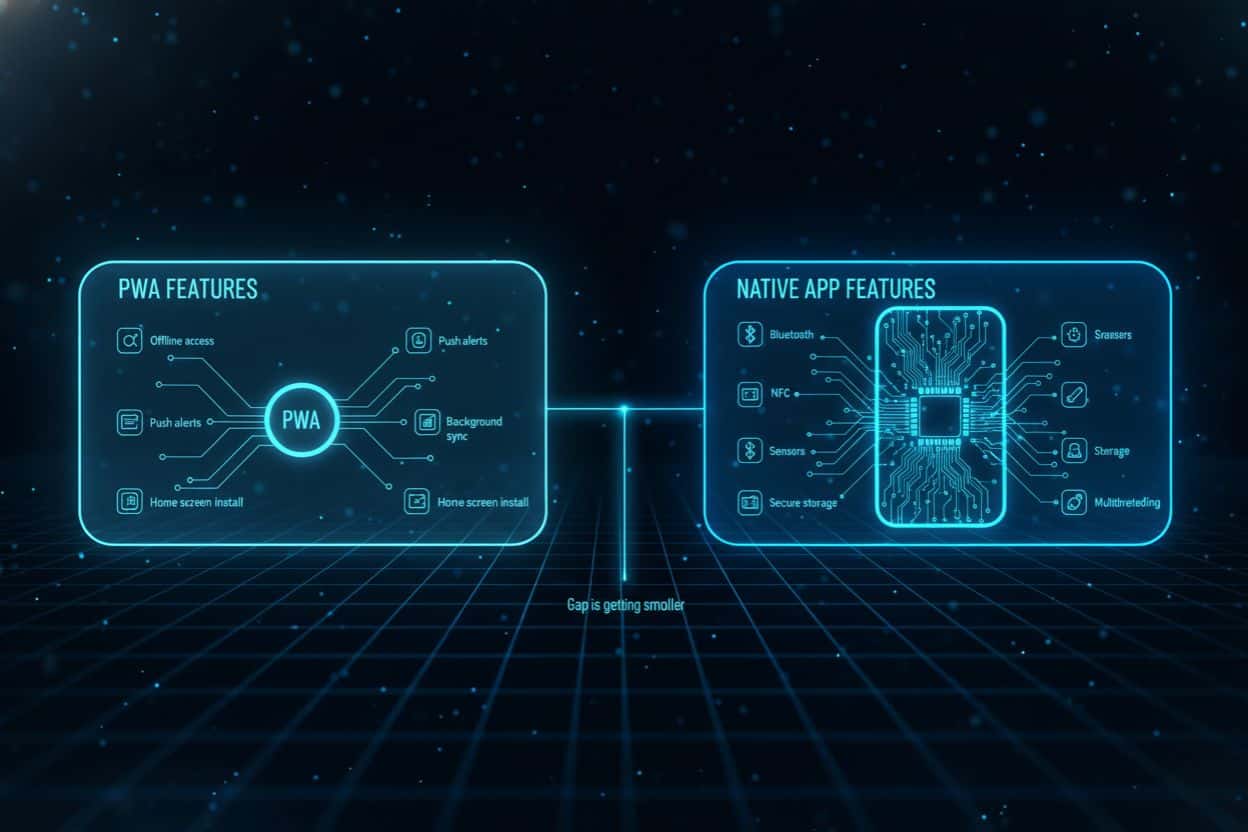
    pwa vs native app feature comparison infographic
    PWAs now support offline use, push notifications, background sync, and home screen installation. The quality of these features depends on the browser.
    Native apps provide the most complete set of features. They support Bluetooth, NFC, secure storage, sensors, background tasks, multithreading, and system actions.
    As browsers improve, the gap gets smaller.
    If you are also comparing modern mobile frameworks, our guide to Flutter vs React Native provides a clear view of how each supports different features.

    PWA Advantages

    Here are essential PWA advantages for companies:

    • One build for all platforms
    • Lower cost and faster updates
    • No store approvals
    • Instant release through URL
    • Easy onboarding without installation
    • Good reach for global markets
    PWAs are a good option for teams that want fast updates and simple user access.

    Native App vs PWA: Security and Trust

    Security plays a big role when choosing between a native app and a PWA. Industries such as banking, healthcare, and insurance handle sensitive data and require strong controls. Native apps use OS-level encryption, secure local storage, and app store checks. This makes them a trusted option for high-risk sectors.
    PWAs utilize HTTPS and standard browser sandboxing, making them secure for general enterprise use. However, for banking-grade security requiring deep biometric integration (FaceID/TouchID at the OS kernel level) or strict data isolation, Native Apps remain the superior choice due to stricter App Store vetting and OS-level encryption standards.

    PWA vs Native: SEO, ASO, and Reach

    PWAs appear in search results, making them easy to reach via links, search results, QR codes, and social channels. This helps content platforms and e-commerce stores.
    Native apps appear in app stores. They grow through ASO, reviews, categories, and store visibility. The store helps build trust, but also adds steps to the installation.
    PWAs do not get store presence unless packaged for listings.

    Use Cases by Mobile App Type

    Each mobile app type is best suited to specific needs.

    Best for PWAs

    • Content Platforms & News Sites: (Instant loading and offline reading increase retention).
    • Online Stores (E-commerce): (Discoverable via Google Search, lowering the barrier to entry for first-time shoppers who don’t want to download an app).
    • Booking and Reservation Tools: (Users often need these services infrequently and quickly; a browser-based experience removes the friction of installation).
    • Customer Portals: (Cross-platform accessibility ensures customers can log in from any device: desktop or mobile without compatibility issues).
    • Internal Business Tools: (Bypasses App Store approval processes, allowing for immediate updates and rapid deployment to employee devices).
    • MVPs (Minimum Viable Products): (Faster development cycles and lower costs allow startups to test market fit before investing in expensive native development).

    Best for Native Apps

    • Gaming: (Direct access to the device’s GPU and hardware ensures high frame rates and smooth 3D rendering that browsers cannot match).
    • Social media
    • Fitness and tracking
    • Banking and finance
    • Apps that require sensors
    • Apps with heavy visuals or fast actions

    Decision Matrix for PWA vs Native

    The choice between PWA vs native depends on priorities.
    Pick a PWA if your goals include reach, fast delivery, simple access, and lower cost. Pick a Native app if you need advanced device features, high performance, smooth visuals, or secure storage.
    Many companies use both. A PWA offers reach, and a native app supports users who want deeper features.

    Implementation Steps

    minimal tech shapes comparing web app and native app

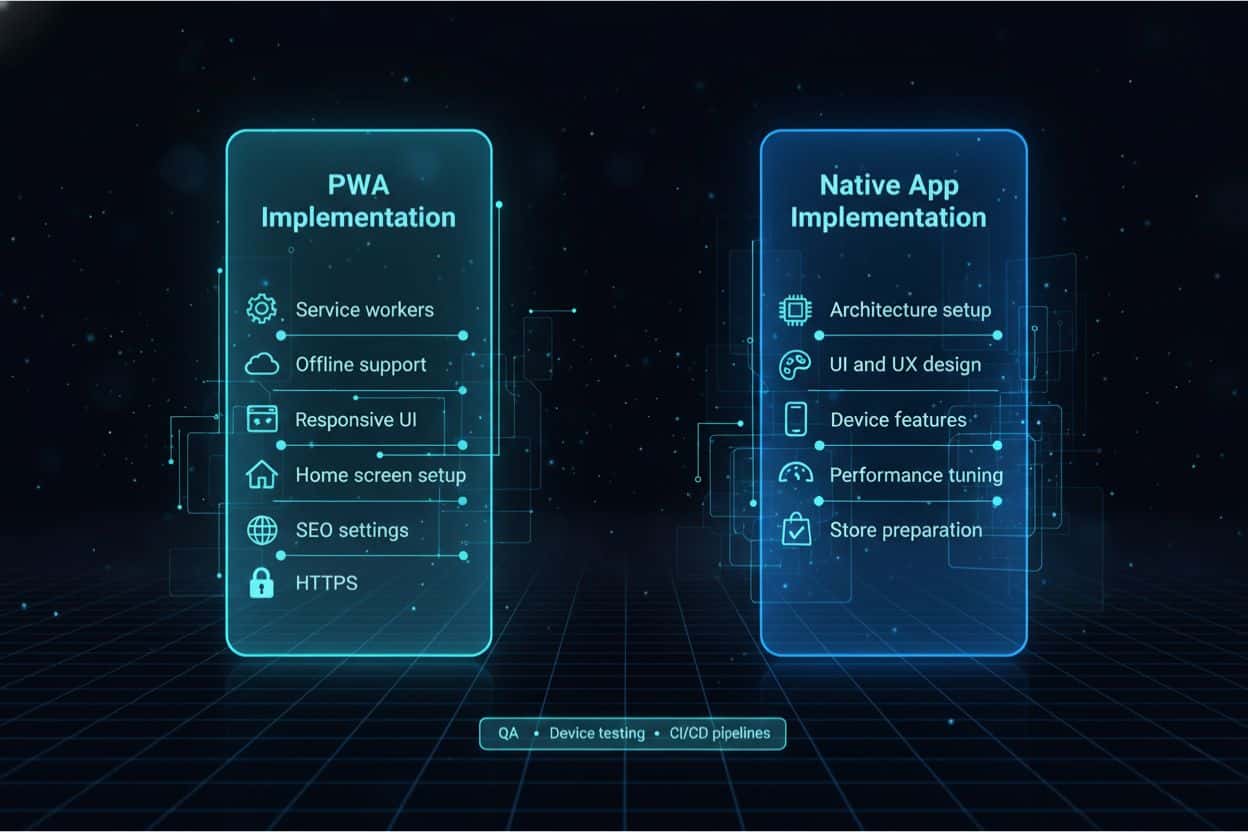
    PWA Implementation

    • Service workers
    • Offline support
    • Responsive interface
    • Home screen setup
    • SEO support
    • HTTPS

    Native App Implementation

    • Architecture planning
    • UI and UX design
    • Device feature integration
    • Performance tuning
    • App store preparation
    Both need strong QA, device testing, and CI CD pipelines.

    Conclusion

    Both progressive web apps and native apps are strong choices for modern products. A PWA offers fast access, broad reach, and lower cost. Native apps provide top performance, richer features, and strong security. The right choice depends on your goals, your target users, and your long-term plan. Shaligram Infotech, a leading software development agency in India, helps teams evaluate PWA and native app solutions so they can choose the platform that fits their technical and business needs.
    PWA vs. Native App comparisons help teams choose a setup that aligns with the product vision and delivers a smooth, reliable user experience.

    Ready to build? Contact our global teams:

    🇺🇸 USA: +1 (919) 629-9671
    🇬🇧 UK: +44 20 3581 6366
    🇮🇳 India: +91 99099 84567
    🇦🇺 AUS: +61 07 3121 3147

    💬 Interested in Regular Insights on Mobile Development?

    📲 Follow Shaligram Infotech on LinkedIn
    Let’s build the future of applications together.

    FAQs

    Is a PWA better than a Native App for performance?

    Yes and no. For initial loading and lightweight tasks, PWAs are often faster because there is no download required. However, for heavy processing and complex animations, Native Apps are significantly faster because they utilize the device’s GPU and hardware directly. Not sure which fits your use case? Schedule a quick consultation.
    PWAs install directly from the browser and open from the home screen.
    PWAs appear in search results and links. Native apps rely on app store visibility.
    PWAs have limits with sensors, Bluetooth, NFC, background tasks, and deep system actions.
    Pick native apps for fast product browsing, deeper personalization, and higher trust through the store.