

Dynamics 365 Implementation Mistakes: What Slows Projects Down and How to Avoid Them

GEt in Touch
Quick Summary :
What are the most common Dynamics 365 implementation mistakes?
The most common Dynamics 365 implementation mistakes are: (1) unclear business objectives before kickoff, (2) poor data preparation and migration planning, (3) misalignment between business and IT teams, (4) over-customization beyond what the platform natively supports, (5) weak project governance and unrealistic timelines, and (6) insufficient user training and change management. Each of these can delay go-live, inflate costs, and reduce ROI.
Why Dynamics 365 Implementation Is More Complex Than Most Businesses Expect
Poor Dynamics 365 CRM Implementation Strategy from the Start

Lack of Clear Business Goals
Misalignment Between Business and IT Teams
Not Defining a Proper CRM Implementation Roadmap
- Implementation phases with clear entry and exit criteria
- Milestones and go/no-go checkpoints
- Resource allocation across business, IT, and vendor teams
- Integration plans for connected systems (ERP, marketing automation, helpdesk)
- Training schedules aligned to role-based user groups
- Risk register and contingency planning
Weak Dynamics 365 Project Management

Poor Communication Between Stakeholders
Lack of Defined Roles and Responsibilities
Unrealistic Implementation Timelines
Ignoring Common Dynamics 365 Implementation Challenges

Data Migration Problems
Migrating data from systems into Dynamics 365 can be a tough part of getting everything set up. When we move data from these systems, we often run into some big problems.
Common problems with moving data include:
- Duplicate records
- Inconsistent data formats
- Missing customer information
- Outdated records
Integration With Existing Systems
Customization vs Configuration Confusion
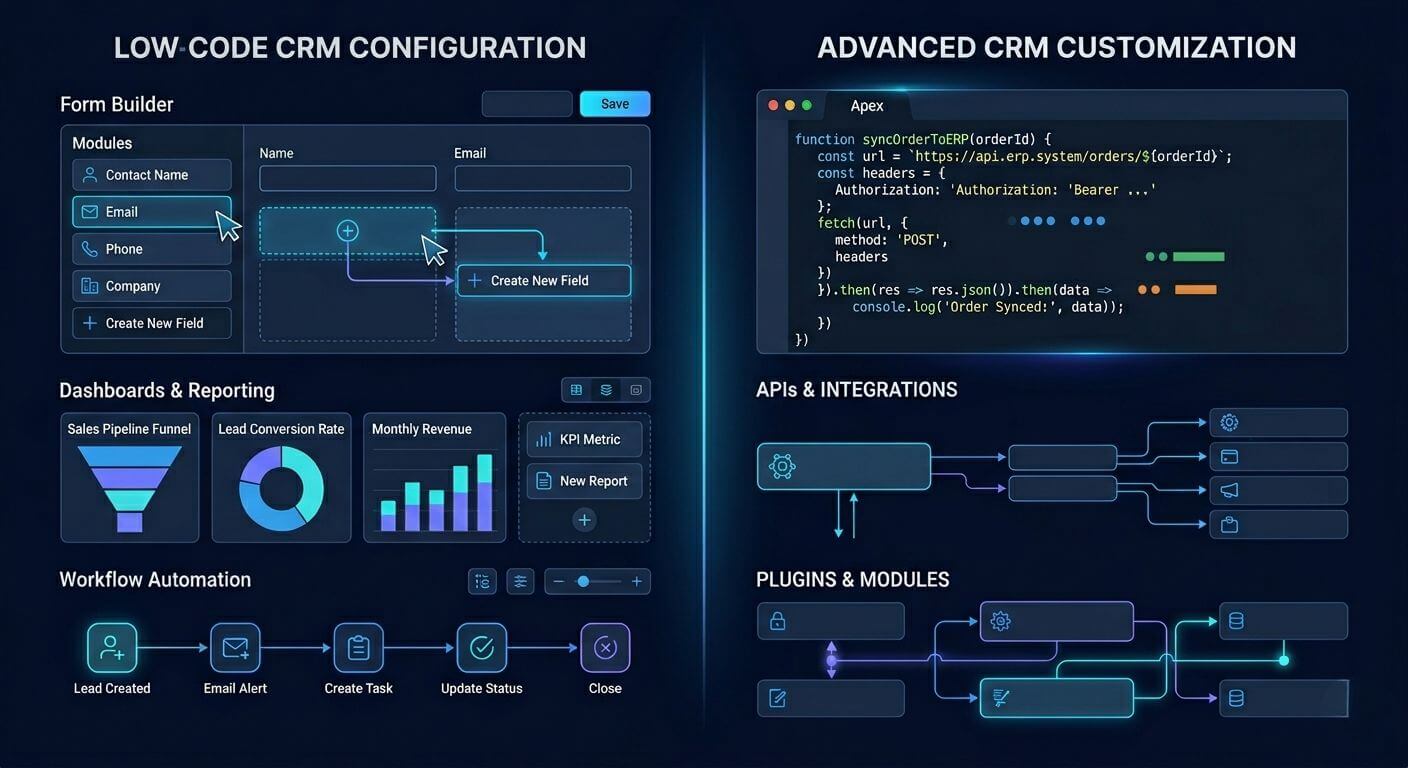
With the ability to configure your Dynamics 365 system out of the box without writing custom code, you can create a customized solution for your organization.
Underestimating Dynamics 365 Deployment Challenges
Poor Data Preparation Before Dynamics 365 CRM Implementation
Lack of a Clear D365 Implementation Plan
Without a clearly defined D365 implementation plan, teams frequently encounter:
- Ambiguous or changing system requirements that cause scope creep
- Delayed integration activities with ERP, marketing, or support platforms
- Insufficient UAT (User Acceptance Testing) planning, leading to post-go-live issues
- Inadequate user training preparation, resulting in poor adoption rates
- No rollback plan if deployment issues arise
Over-Customization During Dynamics 365 Implementation

Lack of Training and User Adoption Planning

Ignoring Dynamics 365 Implementation Best Practices
- Define measurable business goals before kickoff, not just “improve CRM” but specific outcomes like reducing lead response time by 30% or consolidating three legacy systems into one.
- Implement in phases using a pilot-first approach: deploy to one business unit, validate, then roll out company-wide.
- Perform structured UAT with real users testing real-world scenarios, not just technical QA.
- Maintain data integrity through pre-migration audits, deduplication, and field mapping validation.
- Plan for user adoption from day one: assign change champions, create role-based training, and measure adoption post-go-live.
- Use Microsoft’s Success by Design framework as a governance baseline for enterprise D365 implementations.
How to Build a Successful Dynamics 365 CRM Implementation Strategy

Businesses must take several key steps to be successful:
Clearly Define Business Objectives
Develop a Plan for Your Implementation
Emphasize Data Quality
Prioritize Configuration Over Customization
Establish Appropriate Project Governance
Establish clear roles, responsibilities, and communication protocols so everyone involved understands how the project will be managed.
Allocate Resources for Training and Change Management
Conclusion
Awareness of typical failures associated with a Dynamics 365 implementation will give your business the ability to streamline the entire process through proactive resolution of these issues and maximize your investment in this software application. Partnering with an offshore software development company in USA can also help businesses access skilled expertise and cost-effective solutions for smoother implementation. At Shaligram Infotech, we help businesses overcome these challenges with expert guidance and proven implementation strategies.
Ready to build? Contact Our Global Teams
🇺🇸 USA: +1 (919) 629-9671
🇬🇧 UK: +44 20 3581 6366
🇮🇳 India: +91 99099 84567
🇦🇺 AUS: +61 07 3121 3147

💬 Interested in Regular Insights on Microsoft Dynamics 365?
📲 Follow Shaligram Infotech on LinkedIn
Let’s build the future of applications together.


 Get In Touch