
How to Prepare a Software Requirement Specification (SRS) Document
GEt in Touch
Quick Summary :
A Software Requirements Specification (SRS) document is a foundational document that defines a software project’s goals, features, requirements, and constraints. This guide explains the key components of an SRS, the roles involved in its creation, and the step-by-step process for preparing one. It also highlights best practices, benefits, and common mistakes to help ensure successful software development and project alignment.
Every successful web or mobile application development has a solid foundation. It begins with a shared documented understanding of everything that a software must do, how it should behave, and who it is built for, and that’s what we call a Software Requirements Specification (SRS). Whether you are an established enterprise modernizing your existing app or a startup launching your first mobile application, an SRS document is an artifact bridging the gap between clients and developers to understand a working software product.
This guide has a detailed breakdown of everything you need to know about SRS documents and how to prepare them.
What is a Software Requirement Specification (SRS) Document?
Definition and Purpose of an SRS Document
An SRS document is a formally written document that meticulously describes the purpose, functionality, constraints, and behavior of the software system to be developed. It is a roadmap for the software your company is building. It acts as a guide for the development team with an intricate level of detailing on how the software should perform and interact through a set of technical drawings.
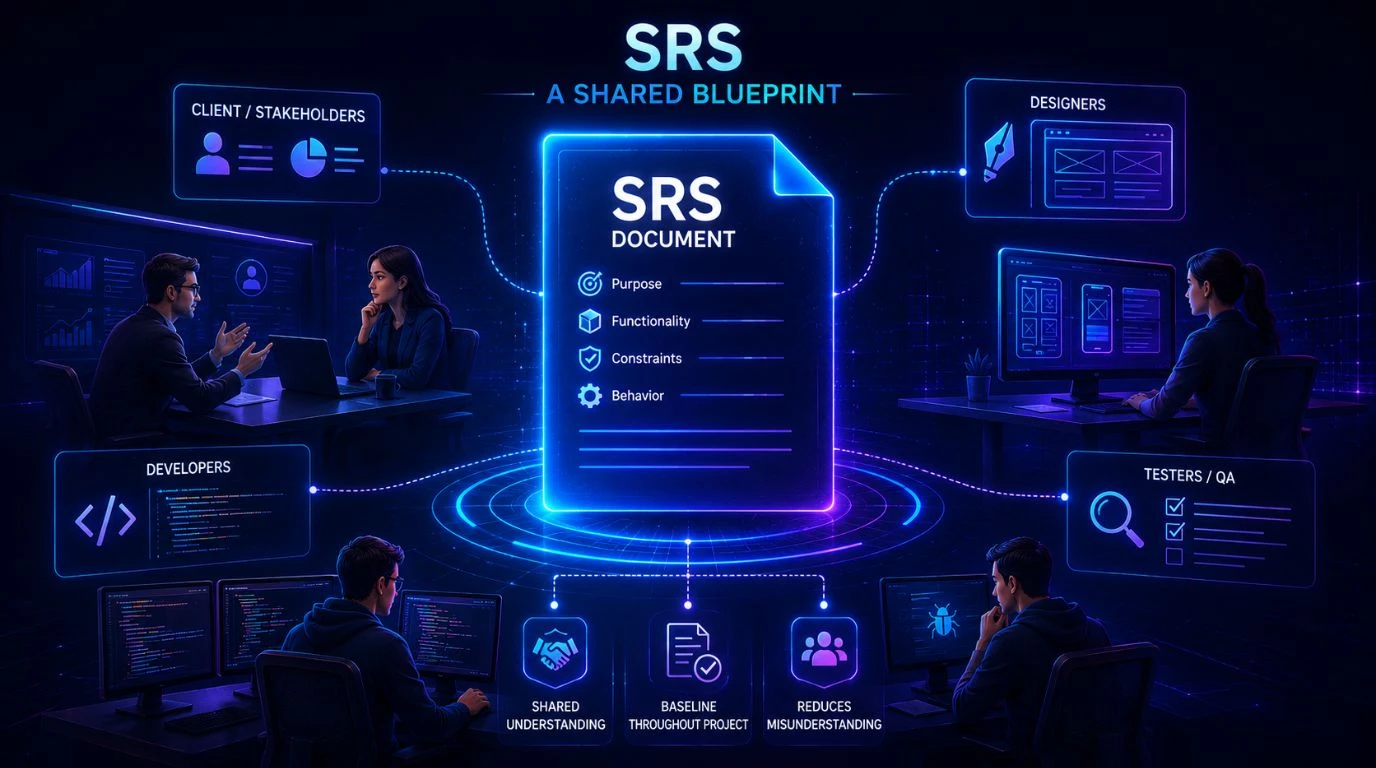
- The purpose of an SRS document is to create a shared language between clients, designers, developers, and testers so that everyone is aligned on project goals.
- It serves as a baseline document throughout the project cycle.
- The SRS document acts as a formal agreement between the client and development team, thereby reducing misunderstandings and miscommunication.
Why Is Software Requirement Specification Important?
Preparing an SRS document is a prerequisite; skipping this process can lead to costly mistakes in software development. Here is why a well-prepared SRS is a non-negotiable.
- Provides legal protection: Compliance officers use an SRS document to demonstrate regulatory conformance. In case of any dispute between a development company and a client, SRS serves as documented evidence.
- Reduces development costs: An SRS document addresses potential issues up front, thereby reducing costly rework.
- Prevents miscommunication: Eliminates interpretation as it serves as a written specification, ensuring that the client’s vision and the development team’s execution are perfectly aligned.
- Enables better testing: Serves as a basis for writing test cases for QA teams so that the testing turns out to be a systematic validation of requirements instead of guesswork.
What Is the Scope of an SRS Document?
The scope of the Software Requirements Specifications (SRS) document defines the exact boundaries of a software project. Here’s what the scope section of an SRS covers:
- Purpose of the system: describes why the software is being developed and the problems it solves.
- Project objectives: Defines the expected benefits and goals of the software.
- Features and functionalities: Lists major functions included in the system.
- Users and stakeholders: Identifies who will use the system.
- Exclusions and system boundaries: A clear definition of what the system will not do is as significant as stating what it will.
What Does an SRS Document Do in a Software Project?
The software requirement specification document acts as a comprehensive blueprint of a software project serving its different critical functions.
Here’s how the SRS document performs throughout the project stages.
- The SRS document clearly and accurately describes timelines, scope, and cost estimates.
- Guides architects to create database and system designs.
- Provides developers with precise and clearly defined feature specifications.
- Serves as a reference point throughout the development process and even for the future.
Who Prepares an SRS Document?
An SRS document is usually prepared collaboratively. However, the product owner or business analyst is the primary owner. They work in close collaboration with system architects, custom software developers, key stakeholders, and QA engineers to create SRS documents. They extract requirements from different team members and organize them into a structured SRS template.
Roles and Responsibilities in SRS Creation
- Business analysts define business goals and feature expectations.
- Software engineers state the technical feasibility, coding structures, and architecture.
- The project manager oversees the SRS preparation process and ensures it keeps timelines and documents aligned with the overall project plan.
- QA/testing teams outline testing criteria, system constraints, and validation metrics.
- Stakeholders review and approve the documented specifications to ensure they meet expectations.
Stakeholders Involved in the SRS Process
There are several stakeholders actively involved in the SRS preparation beyond the core team.
- Product owner or client: They are the key decision-makers and approve the final document. They determine the business’s vision, goals, and budgets.
- End user: They are the actual users, the ones who operate the software. Their input is crucial to defining user experience expectations, workflows, and usability.
- Development team: It is the technical stakeholders who review the SRS to choose the tech stack and dictate the software architecture.
- The third-party vendors: They are the external stakeholders to be consulted during the SRS process.
Key Components of an SRS Document
Introduction and Purpose
Every SRS begins with a clear introduction, which is an answer to a deceptively simple question: What is an SRS document for and from whom?
The section typically includes:
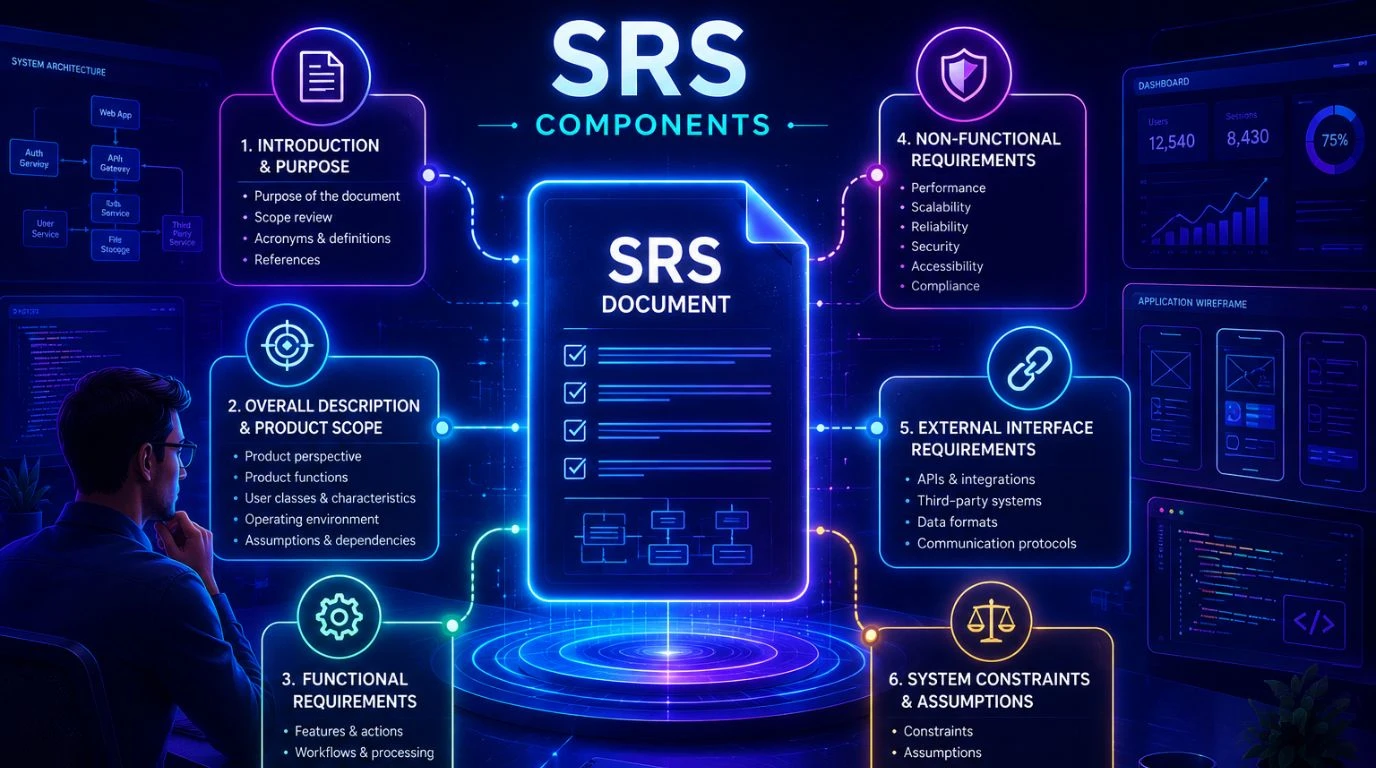
- Purpose of the document: To explain a brief statement on why SRS exists and what decisions it will guide.
- Scope review: It gives a summary of what software will include and what it won’t.
- Acronyms and definitions: Includes a glossary ensuring that everyone speaks the same language throughout the project.
- References: Links to related documents such as project charters, feasibility studies, or prior SRS versions
Overall Description and Product Scope
This section provides a detailed overview of the products, including how they operate and their environment, without getting into specific code technicalities. This section is devoted to the following subsections:
- Product perspective: It explains how the system interacts with external systems. Is the system a new standalone system, a component of a larger architecture, or a legacy system replacement?
- Product functions: A summary of the major capabilities the software will provide.
- User classes and characteristics: What are the technical literacy levels of the system users, who will use it and how frequently, and what are their special needs?
- Operating environment: The physical and technical environment where the system will live. It includes networks, hardware platforms, operating systems, and other software with which it must interact.
- Assumptions and dependencies: External factors, events, or third-party tools upon which the project’s success relies.
Functional Requirements
The functional requirements of an SRS document are to deliver a framework for implementation, which should be obvious throughout the document. Plus, the features and actions, like specific workflows, data processing, and administrative functions, are in EARS format, numbered and described. The functional requirements specify the expected behavior of the system, whose output should be produced from given inputs.
Non-Functional Requirements
Non-functional requirements in an SRS document define how the system should perform instead of what it should do. Non-functional requirements set the quality standards the system must meet to be complete and production-ready. It includes performance, scalability, reliability, security, accessibility, compatibility, and compliance. For projects hosted on cloud infrastructure, see our cloud consulting services. Different software systems require different quality attributes. Therefore, the non-functional requirements may vary depending on the type of project and industry.
External Interface Requirements
It is about how the software program communicates with other software programs in any form of code, message, or language, and with other third-party applications or databases via APIs. If you need help defining or building these connections, our software integration services team can assist. These are specifically essential when working with embedded systems.
System Constraints and Assumptions
This section includes any assumptions the requirements engineering team has about what’s expected to happen during the project and constraints the customer has imposed on the system design. System constraints and assumptions in an SRS document establish boundaries and foundational beliefs of a project.
How to Prepare an SRS Document: Step-by-Step Guide
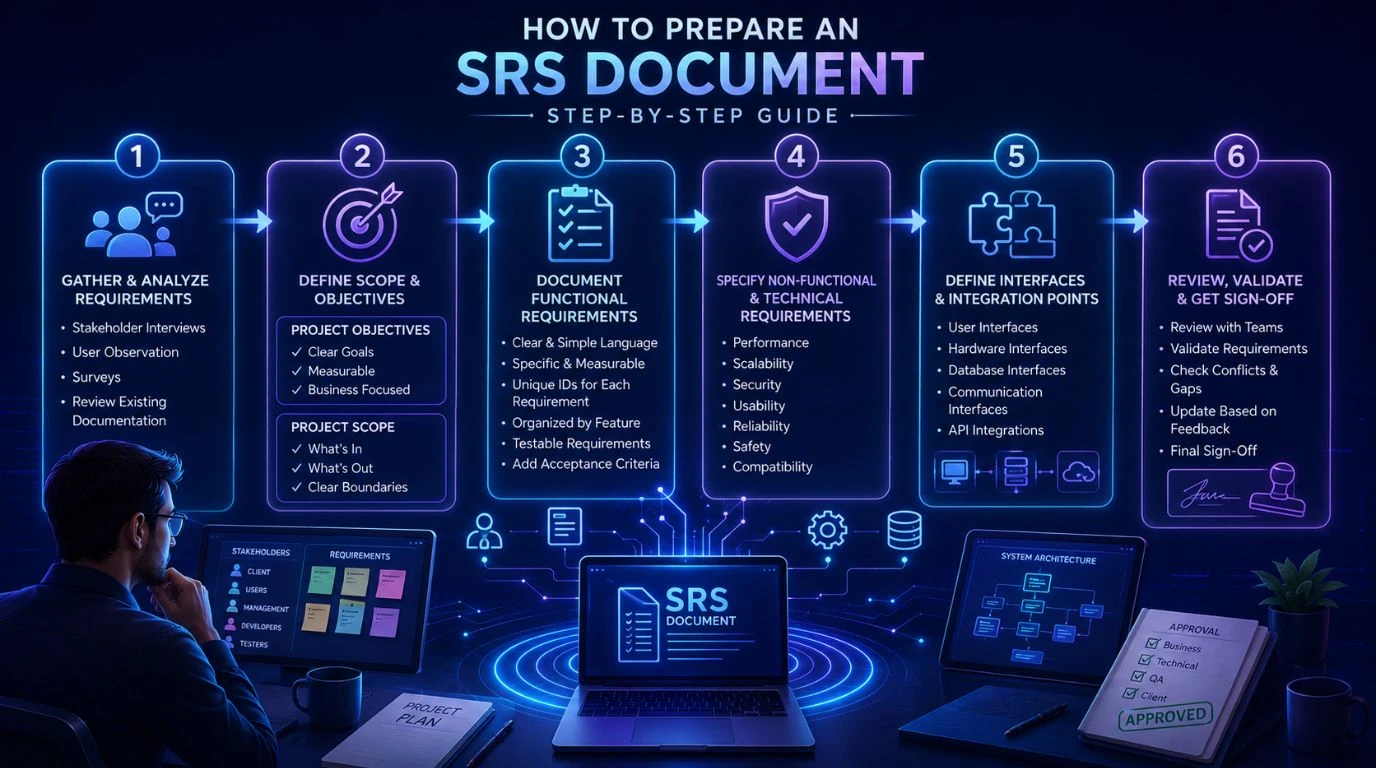
Step 1: Gather and Analyze Requirements from Stakeholders (
This is the very first and crucial step; many rush it. It’s always about understanding what you are creating, knowing the problem, and talking to the right people about it before you begin the actual document preparation. There’s no stated method to gather requirements, but you can use these techniques:
- Observe how users actually work and how it can benefit you to create the document.
- Take interviews of senior stakeholders.
- Take surveys, as they help when you are dealing with a large and distributed user base.
- Review the existing documentation; it explains a lot about what’s currently working, what’s not, and what users have been asking for years.
Step 2: Define the Project Scope and Objectives
Project objectives
- The project objectives should be realistic, measurable, and clear and must describe the specific goals that the software must achieve.
- Tie objectives to business outcomes that the client actually focuses more on.
Project scope
- The project is all about defining the project’s boundaries.
- Define what’s in and what’s out and write it down explicitly.
- Be specific so there’s no room left for assumptions.
Step 3: Document Functional Requirements Clearly
An SRS document becomes more useful when the functional requirements are described clearly. Functional requirements describe what the system must do, and documenting them clearly helps developers understand expected system behavior. It allows testers to verify whether software meets expectations.
- Ensure that the functional requirements are written in simple language.
- Keep them easy to understand and specific. Assign a unique ID to every requirement.
- Logically organize the functional requirements. Organize by feature, not by team.
- Ensure they are testable and measurable.
- Add acceptance criteria for complex requirements.
Step 4: Specify Non-Functional and Technical Requirements
Non-functional requirements define how the system performs instead of what it should do. This section specifies the system’s quality attributes and technical expectations. It includes:
- Safety requirements
- Performance requirements
- Scalability requirements
- Usability requirements
The importance of non-functional requirements may vary depending on your industry.
Step 5: Define System Interfaces and Integration Points
This section of an SRS document must describe how the system interacts with external systems, third-party services, or users. The system interface and integration points must include these points:
- User Interfaces
- Hardware Interfaces
- Database Interfaces
- Communication Interfaces
- API Integrations
It should capture enough interface detail for independent design work and reference Interface Control Documents (ICDs) where applicable. You can also use a diagram or table to show all integration points visually. This is easier for stakeholders to review than a wall of text.
Step 6: Review, Validate, and Get Sign-Off
This is the step where an SRS document becomes a final draft. So ensure you check that all the requirements are complete, accurate, and approved by stakeholders. It is a gate for baseline approval, so a rigorous check of minute detail is non-negotiable.
- Once a draft is ready, review the document with business and technical teams.
- Validate requirements
- Check for any conflicts, missing details, or ambiguities.
- Update the SRS document based on feedback.
- Circulate the final SRS for formal sign-off.
How to Organize an SRS Document Effectively?
An SRS document should be well-organized enough for any stakeholders, either nontechnical or technical, to easily understand and navigate it. Here’s how to create a well-organized SRS document effectively:
- Logically organize all the sections so the readers can find information quickly.
- Use hierarchical membership and sections to improve readability and traceability.
- Keep non-functional requirements separate from functional ones.
- Use tables for clarity whenever possible.
- Include visuals and diagrams to simplify complex system interactions and workflows.
- Avoid ambiguous terms; keep language precise and simple.
- Assign unique IDs to each requirement for tracking the process.
- Maintain a revision table at the beginning of the document.
SRS Document Example and Template
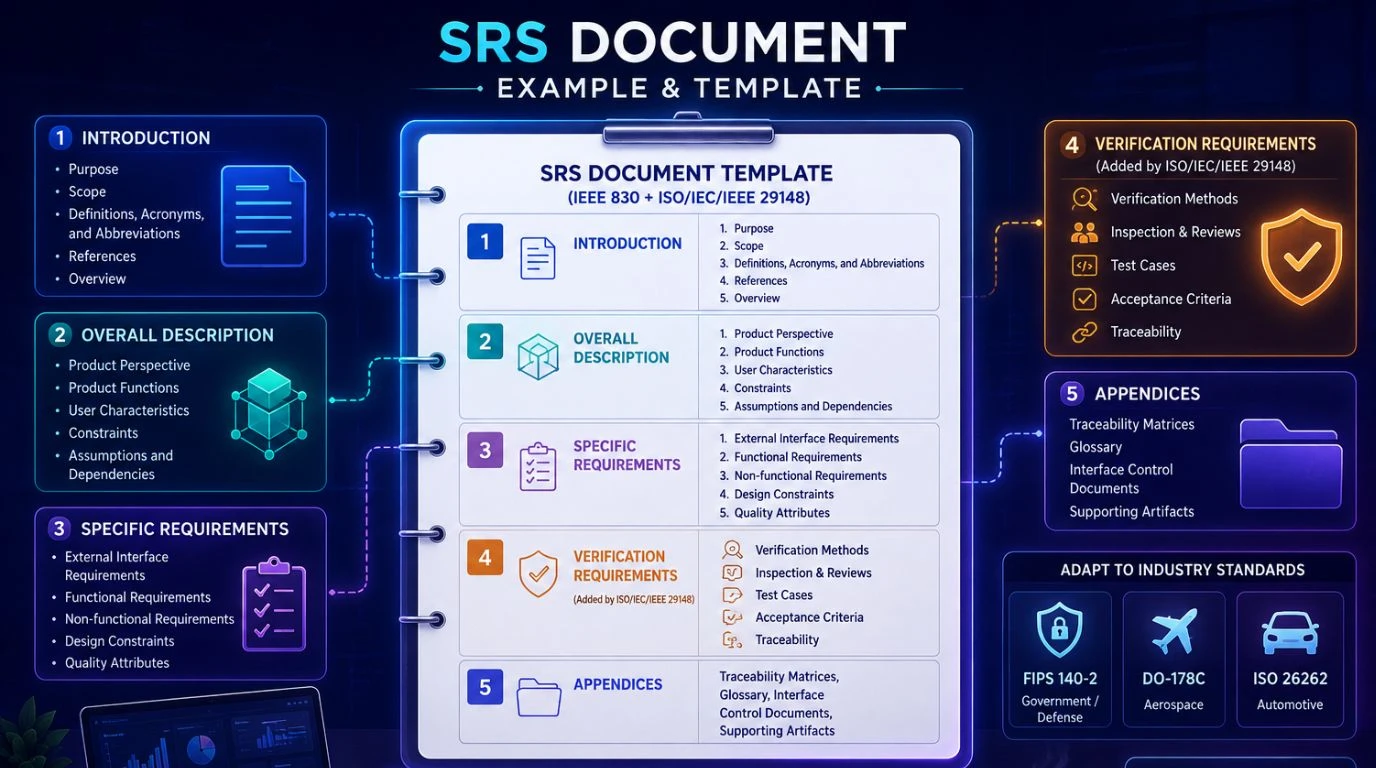
The template below follows the IEEE 830 section structure and adds verification guidance from ISO/IEC/IEEE 29148. It can be adapted to meet industry-specific requirements like FIPS 140-2 for government/defense systems, DO-178C for aerospace, or ISO 26262 for automotive.
Introduction
- Purpose
- Scope
- Definitions, Acronyms, and Abbreviations
- References
- Overview
Overall Description
- Product Perspective
- Product Functions
- User Characteristics
- Constraints
- Assumptions and Dependencies
Specific Requirements
- External Interface Requirements
- Functional Requirements
- Non-functional Requirements
- Design Constraints
- Quality Attributes
Verification Requirements (added by ISO/IEC/IEEE 29148)
Appendices (traceability matrices, glossary, interface control documents)
Sections 1 and 2 orient the reader and provide context. Section 3 is the core, where each requirement gets a unique ID, a “shall” statement, and a measurable acceptance criterion. Section 4 pairs every requirement with a verification method. Teams in regulated industries should also map each section to the relevant standard, such as DO-178C for airborne systems.
Benefits and Advantages of an SRS Document
Serves as a single source of truth: Being a single source of truth, an SRS document keeps developers, designers, project managers, clients, and their stakeholders on the same page. It eliminates ambiguity and reduces conflicting assumptions and misinterpretations.
Reduces development errors: A well-written and organized SRS document prevents scope confusion, incorrect implementations, and misunderstandings, thereby minimizing the cost of rework.
Improves estimation: The project managers can now produce far more accurate estimates of cost, resources, and time with clearly defined requirements.
Facilitates clear communication: An SRS document acts as a bridge between non-technical and technical stakeholders so that everyone speaks the same language and business teams can verify goals without reading code.
Supports quality testing and assurance: Well-defined requirements make software testing accurate and efficient.
Improves project stability: An SRS document is an official agreement between the development team and stakeholders that helps to evaluate, track changes, and control scope creep, thereby enhancing project accountability and stability.
Provides a baseline for change control: Once signed off, the SRS becomes the baseline against which all future changes are measured.
Common Mistakes to Avoid When Writing an SRS Document
Organizations make several common mistakes when building an SRS. Below are the ten serious mistakes an organization should never make:
Lack of clarity: Complex things are meant to be written in the simplest language. So do not use vague terms or ambiguous language in the SRS document.
Missing a data dictionary or glossary: IEEE 830 requires “definitions of all terms required to interpret the SRS properly.” Without a glossary, different stakeholders may interpret terms differently, leading to implementation errors and confusion.
Neglecting usability and accessibility. Failing to define how easily users can interact with the system or whether the application is accessible to all users leads to problems during and after software development.
Incomplete stakeholder input: The critical gap can occur in the SRS document if an organization fails to include stakeholders in it, especially the business analysts and end users.
Not managing changes: An SRS document isn’t static but dynamic. Failing to establish a strong requirements management process can lead to confusion, rework, and project delays.
Conclusion
Writing a software requirement specification document is one of the most valuable investments a project team can make. SRS is the basis for your entire development project, so be specific, be complete, be measurable, and ensure that everyone agrees before the final work begins. A well-prepared, organized, and structured SRS document gives clarity to developers on what they need to build, provides testers the criteria on what they need to verify, and delivers stakeholders the assurance that they are actually being delivered what they asked for.
Ready to build? Contact Our Global Teams
🇺🇸 USA: +1 (919) 629-9671
🇬🇧 UK: +44 20 3581 6366
🇮🇳 India: +91 99099 84567
🇦🇺 AUS: +61 07 3121 3147

💬 Interested in Regular Insights on Software Development?
📲 Follow Shaligram Infotech on LinkedIn
Let’s build the future of applications together.
FAQs
What is an SRS document in software development?
What is an SRS document in software development?
An SRS (Software Requirements Specification) is a comprehensive document that outlines the purpose, behavior, and functional/non-functional requirements of a software application. It acts as a foundational blueprint and binding contract between clients and developers to align business goals with technical execution.
How do you prepare an SRS document for a project?
How do you prepare an SRS document for a project?
Preparing an SRS document requires meeting with stakeholders to understand the software’s purpose, scope, functional and non-functional requirements, and constraints. Document your interfaces, run a structured review with your technical and business leads, then get formal sign-off before development starts.
What are the advantages of an SRS document?
What are the advantages of an SRS document?
An SRS document provides several benefits, like:
- Clear understanding of requirements
- Reduced development errors
- Improved communication
- Provides project stability and accountability.
- Acts as a contractual reference
- Provides a baseline for change control
Who is responsible for preparing the SRS document?
Who is responsible for preparing the SRS document?
Generally, a business analyst or product manager leads the effort, but it is never a solo job. Developers review for feasibility, QA verifies testability, stakeholders contribute the business goals, and compliance teams weigh in where needed. One person owns it; everyone contributes to it.
What is the standard format for an SRS document?
What is the standard format for an SRS document?
The standard format for a Software Requirements Specification (SRS) document follows the ISO/IEC/IEEE 29148 standard (which superseded IEEE 830). It serves as a comprehensive blueprint that prevents misunderstandings between stakeholders, developers, and QA teams.

 Get In Touch