
Categories
Blog Microsoft
Dynamics 365 Implementation Mistakes: What Slows Projects Down and How to Avoid Them
Microsoft

Dynamics 365 Implementation Mistakes: What Slows Projects Down and How to Avoid Them

Showcasing Common Mistakes That Slow Down Dynamics 365 Implementations Banner

GEt in Touch


    TABLE

      Why Dynamics 365 Implementation Is More Complex Than Most Businesses Expect

      Microsoft Dynamics 365 is a cloud-based business applications platform that combines CRM and ERP capabilities across sales, customer service, field service, finance, supply chain, and marketing. A Dynamics 365 implementation is the end-to-end process of deploying, configuring, integrating, and adopting one or more of these modules within an organization typically delivered in structured phases over weeks to months depending on scope and complexity. Because it works closely with the way a company does business, putting it in place can affect parts of the company, like different departments and systems.
      Some companies think they can set up a customer relationship management system like Microsoft Dynamics 365 quickly and easily. The truth is, it takes a lot of planning and work to get it right. Companies need to plan to manage the project well, get their data ready, and make sure the technical and business teams work well together.
      When companies do not get ready for the challenges of setting up Microsoft Dynamics 365, things can go wrong. Projects can be delayed because the requirements are not clear, there are problems, or users do not want to use the new system. If companies understand these challenges from the start, they can avoid making mistakes and keep the project on schedule. When implemented correctly, Dynamics 365 improves efficiency across sales, service, finance, and operations.

      Poor Dynamics 365 CRM Implementation Strategy from the Start

      Lack of Clear Business Goals

      A CRM implementation should always start with business objectives that are easy to understand. Many organizations begin using Dynamics 365 without knowing what they want to get out of it. For instance, companies might say they want to manage their customers, but they do not say what that means. They do not say things like we want to get leads to buy our products, or we want to sell things to people faster, or we want to help our customers when they have problems sooner.
      When you do not have goals, it is hard to figure out what you need from the system, what is important, and if you are doing a good job. This can cause a lot of problems, like trying to make too many changes all the time and taking too long to get everything working. Dynamics 365 implementation can be a project, and companies need to have clear goals for their CRM implementation.
      To avoid these issues, many businesses choose to hire Dynamics 365 developers who can align the system with their goals and ensure a smooth implementation process.

      Misalignment Between Business and IT Teams

      Another common mistake is that business teams and IT departments are not on the same page.
      Business teams know the problems they want to fix and what they do every day, while IT teams focus on the technical side. If these teams do not work together properly, the system they create may not really help the business.
      When business and IT teams are not aligned, it can cause problems like setting up the system, making work more difficult and frustrating for users. When departments work together, from the start, they can make sure the CRM solution works technically and fits with how the business really works.

      Not Defining a Proper CRM Implementation Roadmap

      A Dynamics 365 CRM implementation roadmap should define:
      • Implementation phases with clear entry and exit criteria
      • Milestones and go/no-go checkpoints
      • Resource allocation across business, IT, and vendor teams
      • Integration plans for connected systems (ERP, marketing automation, helpdesk)
      • Training schedules aligned to role-based user groups
      • Risk register and contingency planning
      If you do not have a clear roadmap, projects can get off track. Teams might work on tasks without knowing what is most important. This can cause delays and confusion during the implementation process of the project. The implementation roadmap is really important to keep the project on track.

      Weak Dynamics 365 Project Management

      CRM project workflow delays

      Poor Communication Between Stakeholders

      Effective Dynamics 365 project management requires coordinating a wide group of stakeholders, including executives, department leads, IT architects, implementation consultants, and end users all working toward the same goal.
      When these groups do not talk to each other well, they get confused about what they need, when things are supposed to happen, or what the system can do. This means they must do rework, face frustration, and delays.
      Customer relationship management projects need to have updates, easy ways for people to talk to each other, and meetings where everyone agrees on things. This makes sure the project is going as planned with the customer relationship management implementation. The customer relationship management implementation needs updates and clear communication to succeed.

      Lack of Defined Roles and Responsibilities

      People often have trouble when team members do not know what they are supposed to do.
      If the people working on the project do not know what their jobs are, they might do the work twice or forget to do something important. For instance, it might not be clear who is in charge of moving the data from one place to another. Nobody might be responsible for making sure the workflows work properly.
      When you make sure everyone knows what their job is, like the project sponsor, solution architect, data migration lead, and user training coordinator, then you know who is responsible for what, and things get done easily.

      Unrealistic Implementation Timelines

      Some companies try to get Dynamics 365 up and running really fast, thinking it is easy to set up.
      However, putting in a customer relationship management system is a big job. It includes getting everything set up right, moving data over, connecting it to other systems, testing it, and teaching users how it works. If you rush through these steps, you might make mistakes in the system, and people might not want to use it. You could end up spending a lot of money to fix things.
      If you give yourself time, your team can get Dynamics 365 set up properly and make sure it works the way your business needs it to.

      Ignoring Common Dynamics 365 Implementation Challenges

      CRM data migration and data transformation

      Data Migration Problems

      Migrating data from systems into Dynamics 365 can be a tough part of getting everything set up. When we move data from these systems, we often run into some big problems.

      Common problems with moving data include:

      • Duplicate records
      • Inconsistent data formats
      • Missing customer information
      • Outdated records
      If we do not make sure the data is correct and clean before we move it, it can cause a lot of mistakes in the system, and people will not trust it as much. Dynamics 365 is the system we are talking about. We need to get the data migration into Dynamics 365 right.

      Integration With Existing Systems

      Most companies use a lot of systems for things like finance and marketing. They also use these systems for things like ERP and support operations. Dynamics 365 needs to work with all these systems so that data can flow easily.
      When we try to get all these systems to work together, we can run into problems. This happens when the systems are not compatible or when the software is old. Sometimes the APIs are not good. That causes problems, too. If we do not plan the integration carefully, the teams will have to deal with delays. They will not be able to work very efficiently. Dynamics 365 and all these other systems, like finance and marketing, need to be integrated.

      Customization vs Configuration Confusion
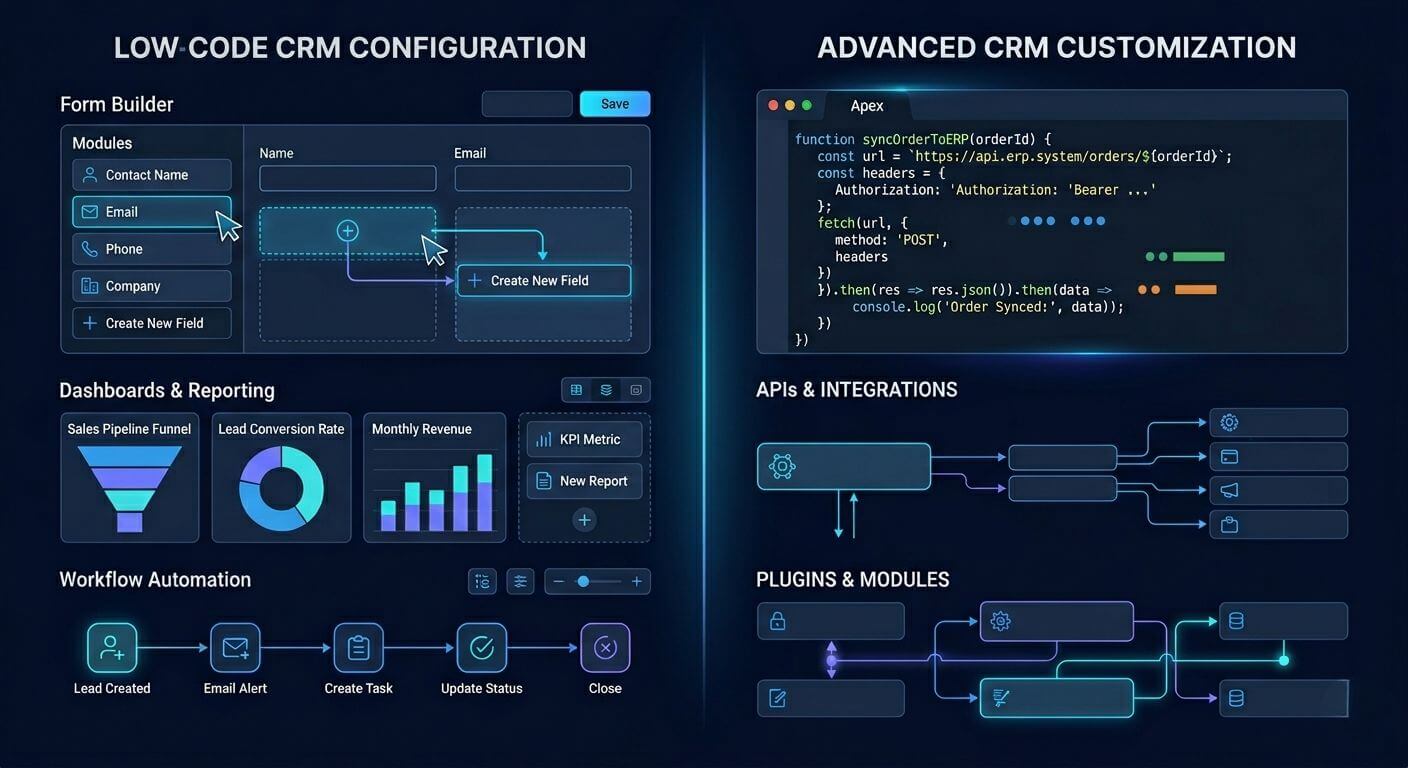
      Dynamics 365 customization vs configuration

      With the ability to configure your Dynamics 365 system out of the box without writing custom code, you can create a customized solution for your organization.

      Unfortunately, businesses often think about customization first when implementing a new solution rather than utilizing the many ways that the Dynamics 365 configurational capabilities provide; by customizing your system, you can increase the time and cost of developing a solution, as well as create complexities in the future for supporting that custom solution.
      By differentiating between configuration and customization, organizations will make more informed decisions when implementing their new system. Understanding the difference between configuration and customization is critical for maintaining scalability and reducing long-term complexity.

      Underestimating Dynamics 365 Deployment Challenges

      Another contributing factor that can slow down an implementation project is the difficulty of the actual deployment.
      Often, organizations do not plan effectively for deployment tasks, including environment preparation, system testing, security configuration, and performance optimization.
      If deployment is not planned correctly, it can create a chaotic environment, resulting in unanticipated delays in the final phase of implementation.
      To ensure that system testing, validation, and rollout occur smoothly, a structured deployment plan is important.

      Poor Data Preparation Before Dynamics 365 CRM Implementation

      Data quality is critical to how well a CRM performs.
      When moving your existing data into Dynamics 365, ensure it is cleaned, standardized, and validated before migration. Unfortunately, many companies skip this step and try to move raw data directly into their CRM.
      This usually leads to duplicate records, missing pieces of information regarding the customer, and inaccurate reporting.
      When you have taken proper steps to prepare your data, the CRM will provide accurate reports, allowing the company to make sound decisions based on the information provided by the system.
      Data governance and security standards also play a key role in ensuring reliable CRM performance.

      Lack of a Clear D365 Implementation Plan

      Without a clearly defined D365 implementation plan, teams frequently encounter:

      • Ambiguous or changing system requirements that cause scope creep
      • Delayed integration activities with ERP, marketing, or support platforms
      • Insufficient UAT (User Acceptance Testing) planning, leading to post-go-live issues
      • Inadequate user training preparation, resulting in poor adoption rates
      • No rollback plan if deployment issues arise
      A structured implementation plan should cover five phases: Discovery and Requirements, Solution Design, Development and Configuration, Testing and UAT, and Go-Live and Post-Implementation Support. Each phase should have defined owners, deliverables, and sign-off criteria before the next phase begins.

      Over-Customization During Dynamics 365 Implementation

      One of the most common errors when deploying customer relationship management systems within an organization is over-customization.
      Applying too many customizations can undermine system stability and make future upgrades significantly more complex, costly, and time-consuming, often breaking functionality when Microsoft releases platform updates. Ultimately, through excessive customization, an organization’s CRM will become difficult to maintain, upgrade, and support over the long term.
      As a result, the anticipated implementation timeframes will be significantly exceeded. Therefore, organizations should place greater emphasis on their core use of standard product capabilities and use custom solutions only when necessary.
      Over-customized systems often create challenges during future upgrades and platform maintenance.

      Lack of Training and User Adoption Planning

      CRM user adoption and training issues
      A business can use highly functional, technically advanced customer relationship management software. However, the business will fail if employees do not use the CRM system effectively.
      Most businesses focus more on CRM implementation than on user training and adoption.
      Inadequate user training prevents employees from fully utilizing CRM functionality, resulting in low user adoption and incomplete data entry.
      Successful CRM implementations include thorough employee training, user documentation, and ongoing user support. This is required to help the employee fully embrace the new technology.

      Ignoring Dynamics 365 Implementation Best Practices

      Best practices help prevent organizations from failing to implement successfully by ensuring adherence to specific standards, resulting in smoother implementations.
      Failure to adhere to best practices can result in inefficient processes, poor system performance, and lower-than-expected ROI due to unsuccessful CRM implementation.
      Key Dynamics 365 implementation best practices include:
      • Define measurable business goals before kickoff, not just “improve CRM” but specific outcomes like reducing lead response time by 30% or consolidating three legacy systems into one.
      • Implement in phases using a pilot-first approach: deploy to one business unit, validate, then roll out company-wide.
      • Perform structured UAT with real users testing real-world scenarios, not just technical QA.
      • Maintain data integrity through pre-migration audits, deduplication, and field mapping validation.
      • Plan for user adoption from day one: assign change champions, create role-based training, and measure adoption post-go-live.
      • Use Microsoft’s Success by Design framework as a governance baseline for enterprise D365 implementations.
      Following established best practices will significantly reduce the risks of implementing a CRM and improve overall project success rates.

      How to Build a Successful Dynamics 365 CRM Implementation Strategy

      Connected CRM ecosystem with automation
      To successfully implement Dynamics 365, the technology, strategy, and change management need to work as a single, cohesive process that strikes the optimal balance among them.

      Businesses must take several key steps to be successful:

      Clearly Define Business Objectives

      Before you start your implementation, determine exactly what you expect the new CRM to resolve and what it will accomplish for you.

      Develop a Plan for Your Implementation

      Next, develop a plan outlining all the phases, timelines, and resources of your Dynamics 365 implementations.

      Emphasize Data Quality

      Data quality is critical for reporting and analytics. Data cleansing and preparation should be part of your migration strategy to ensure that the migrated data provides accurate metrics and reporting.

      Prioritize Configuration Over Customization

      Leverage the out-of-the-box functionality provided by Dynamics 365 whenever possible to minimize the amount of complexity introduced to the solution.

      Establish Appropriate Project Governance

      Establish clear roles, responsibilities, and communication protocols so everyone involved understands how the project will be managed.

      Allocate Resources for Training and Change Management

      Provide employees with a clear understanding of why Dynamics 365 will be important to them and deliver appropriate training so they can adopt the new system.
      When you utilize the above steps, your organization will significantly increase the probability of a successful Dynamics 365 implementation.

      Conclusion

      When implemented correctly, Dynamics 365 from Microsoft can transform the way a company operates. However, many companies fail to take advantage of the benefits offered by this technology because of poor planning, insufficient project management, and/or a lack of experience with data-related challenges or excessive customization.
      Awareness of typical failures associated with a Dynamics 365 implementation will give your business the ability to streamline the entire process through proactive resolution of these issues and maximize your investment in this software application. Partnering with an offshore software development company in India can also help businesses access skilled expertise and cost-effective solutions for smoother implementation. At Shaligram Infotech, we help businesses overcome these challenges with expert guidance and proven implementation strategies.
      To realize the full potential of Dynamics 365, companies should develop a carefully thought-out strategy with clear lines of communication between teams, concentrate on the end-user experience as their primary concern, and successfully implement the software for operational growth and efficiency.

      Ready to build? Contact Our Global Teams

      🇺🇸 USA: +1 (919) 629-9671

      🇬🇧 UK: +44 20 3581 6366

      🇮🇳 India: +91 99099 84567

      🇦🇺 AUS: +61 07 3121 3147

      💬 Interested in Regular Insights on Microsoft Dynamics 365? 󠀢󠀢󠀢󠀢

      📲 Follow Shaligram Infotech on LinkedIn
      Let’s build the future of applications together.

      FAQs

      What are the most common Dynamics 365 implementation mistakes?

      Businesses may encounter many problem areas in their CRM projects, including a lack of clarity around business goals, improper data preparation, excessive customizations, no user training, ineffective project management, and no integration with existing systems. Facing these challenges? Contact us today to get expert guidance for a successful Dynamics 365 implementation.
      Some of the most significant challenges faced by companies in deploying their CRM solutions are data migration, integration of different systems, managing customizations made to the CRM software, ensuring that users adopt and use the CRM system, and aligning business processes with how the CRM system works.
      The length of time it takes to implement a CRM system varies based on the complexity of each company’s project. A small or basic Dynamics 365 implementation typically takes 6 to 12 weeks, depending on scope and data complexity. Mid-size implementations often range from 3 to 6 months, while large enterprise deployments involving multiple modules, integrations, and data migrations can take 9 to 18 months or more.
      To avoid issues during the deployment of your CRM solution, define your business goals before beginning your project, prepare your data prior to beginning the project, utilize a consultant who is experienced in assisting companies with implementing their CRM solutions, and utilize proven CRM deployment methodologies.
      Business success through CRM use will be achieved through the implementation of this overall strategy, which consists of the following key points: defined business objectives, a structured implementation roadmap, effective project governance, a well-prepared data set, minimal customization, and adequate user training.